- Published on
How Agentic Loops Are Changing Website Chat
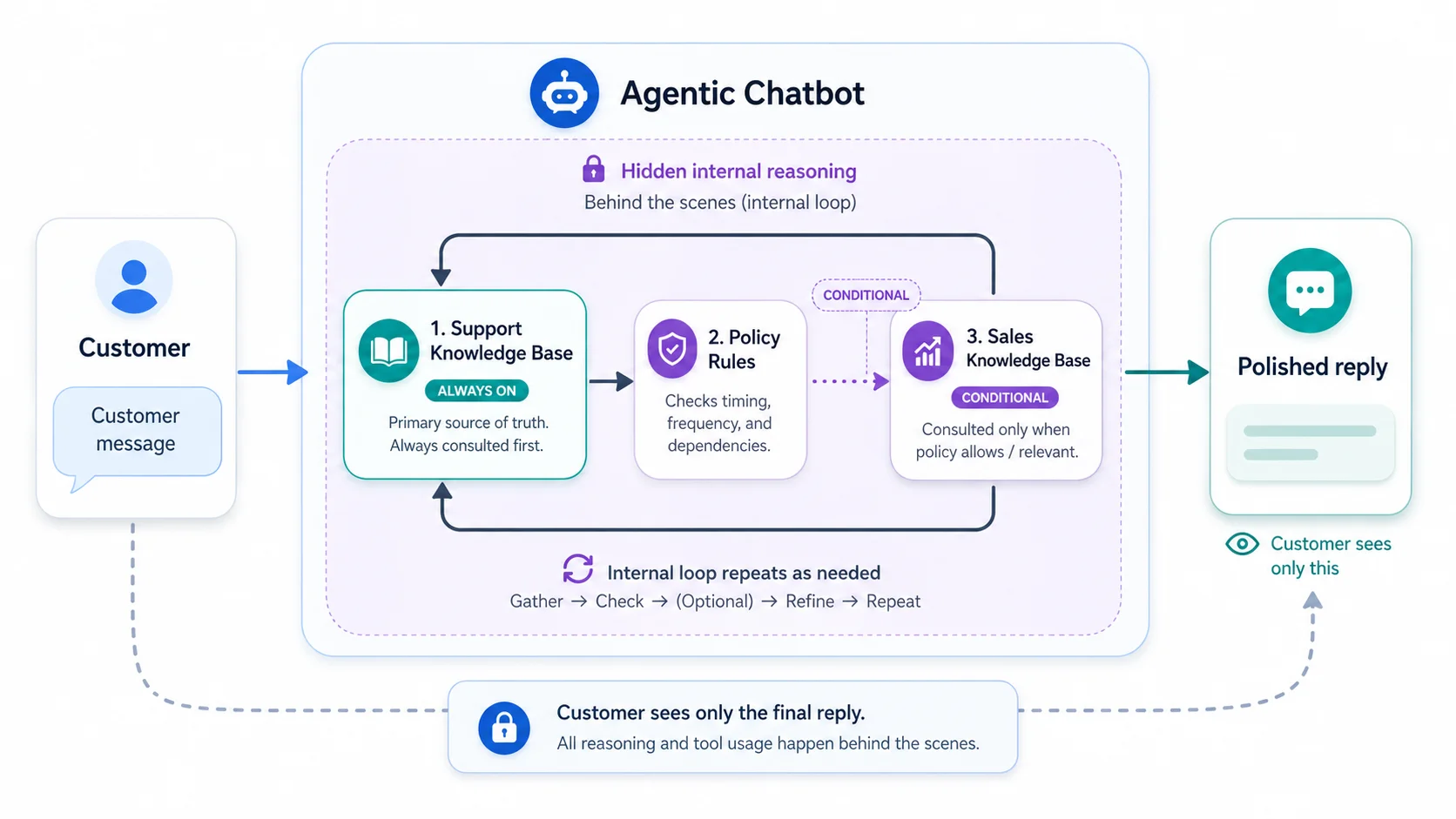
If you have been using Predictable Dialogs to power your website chatbot, you already know how much value a well-trained bot brings. You upload your documents, set up your knowledge base, and watch your bot answer customer questions without extra effort from your team. That is a strong foundation, but there is still a ceiling to what a document lookup bot does on its own.
What if your chatbot could think in steps? What if it could look something up, decide what to do next based on what it found, and then take another action before giving the customer one clear reply? That is what an agentic loop makes possible, and this capability will come to Predictable Dialogs.
From Lookup to Loop
Today, most chatbots work in a straight line: customer asks a question, bot searches documents, bot replies. It is fast, it is reliable, and for simple support questions it works beautifully.
An agentic loop changes the shape of that process. Instead of one step, the bot runs multiple steps behind the scenes before it replies. Each step uses a different tool, one tool looks up support information, another checks sales content, and another handles a separate task. The customer sees only the final polished reply. The underlying work stays invisible.
Think of it as the difference between a junior support rep reading from a script and a senior rep who quietly checks three sources before responding. The customer gets a better answer, and they do not need to see every internal step.
Two Knowledge Bases, One Conversation
Here is how this works in a real setup on Predictable Dialogs. You connect two document collections to your chatbot:
Support knowledge base: your FAQs, product manuals, troubleshooting guides, and return policies. Everything your support team uses to answer questions.
Sales knowledge base: your add-ons, upgrade options, complementary products, and promotional content. Everything your sales team naturally suggests when the moment is right.
In an agentic loop, both are available to the bot as separate tools. The bot can search one, the other, or both, depending on the conversation and the policies you configure.
What Are Policies?
Policies are the rules you set for when each tool gets used. You do not write code. You configure behavior. In the upcoming Predictable Dialogs policy settings, you will be able to set options like:
- Always: this tool runs on every reply. Your support search tool should always run so the bot stays grounded in your documents.
- Every N replies: this tool runs once every few replies. Your sales tool might run once every five replies so the bot occasionally surfaces a relevant add-on without being pushy.
- Only after another tool has run: this tool activates only after a prior tool has completed. You might want the sales tool to run only after the support tool has found a relevant answer, so the cross-sell stays tied to the support context.
- Required vs. automatic: some tools should always run on their scheduled turn. Others stay optional, letting the bot decide whether the result belongs in the final reply.
These combinations give you fine-grained control over your bot behavior, without writing a single line of code.
Real Scenarios: Where This Gets Interesting
Scenario 1: The Frustrated Customer Who Becomes a Loyal One
A customer messaged your bot: "My internet keeps dropping every evening, what's going on?"
With an agentic loop, here is what happened before the bot replied:
- The support tool searched your knowledge base and found troubleshooting steps for intermittent connectivity during peak hours.
- This happened to be the fifth reply in the session, the sales tool was scheduled to run every five replies, so it also searched your sales knowledge base and found a premium router rental with guaranteed quality of service during peak hours.
The bot reply addressed troubleshooting first, then naturally closed with: "If evening connectivity is regularly important to you, our premium router plan guarantees prioritized performance during peak hours, and many customers in similar situations said it solved the problem entirely."
The customer felt heard. The upsell felt relevant, not random.
Scenario 2: The Policy That Prevents Premature Selling
A customer was mid-way through a complaint: "I was charged twice for my subscription this month."
This was not the moment for a sales pitch. With a dependsOn policy, you configured the sales tool to activate only after the support tool found a resolution, not just any answer. Until the support issue was acknowledged and addressed, the sales tool stayed silent. The bot stayed focused on the problem.
Once the issue was resolved two messages later and the customer replied "okay thanks, that makes sense", the next reply naturally included a loyalty offer. The timing felt human because the policy enforced human-like judgment.
Scenario 3: The Onboarding Customer Who Needs a Nudge
A new customer asked basic setup questions: "How do I connect my device to the app?"
The bot answered each question from the support knowledge base. Every three replies, the sales tool quietly checked for a relevant accessory, tutorial package, or premium onboarding service. On the third reply, alongside setup instructions, the bot mentioned: "By the way, our guided setup service can do all of this for you in 15 minutes, and many new customers said it saved them time."
There was no hard sell and no interruption. It was a well-timed suggestion that also generated revenue.
Scenario 4: The High-Value Customer at Renewal Time
Your sales knowledge base included renewal offers and loyalty discounts. You configured the sales tool to run every ten replies at low frequency, so conversations did not feel like sales calls.
A customer who chatted frequently naturally hit that threshold. When they did, the bot checked the question in the context of sales documents and, if there was a natural fit, wove it into the reply. A customer asking about current plan features got: "You're on our standard plan, your current features are X and Y. If you need Z, our plus plan covers that and is currently available at a loyalty rate for existing customers."
The customer was not asking to be sold to. The timing was right, the information was accurate, and the offer was genuinely relevant.
Why This Matters for Your Business
The traditional worry with chatbot cross-selling is that it feels robotic and pushy, like a pop-up that does not go away or a bot that tries to sell while someone is reporting an issue. Policies solve this by putting context and timing in your hands.
You are not programming sales pressure. You are programming good judgment. The bot surfaces the right information at the right moment, and it stays quiet when it should not speak.
For your customers, this means conversations that feel more like talking to a knowledgeable person than querying a database. For your business, it means a support channel that naturally contributes to revenue without creating a separate sales workflow.
What's Coming in Predictable Dialogs
The policy configuration screen is in active development. When it launches, you will be able to configure per-tool policies directly from your dashboard with no technical knowledge required. You will choose your schedule, set your dependencies, and decide whether a tool is required or optional on each turn.
If you have already built your knowledge base on Predictable Dialogs, you are most of the way there. The documents you upload are the foundation, and policies will give them better timing.
A chatbot that knows what to say is good. A chatbot that also knows when to say it will be transformational.
Frequently Asked Questions
What is an agentic loop in a website chatbot?
An agentic loop lets your chatbot run multiple internal steps before it sends a response, so answers are more complete and context-aware.
How do separate support and sales knowledge bases work together?
Each knowledge base connects as its own tool. The chatbot can pull support answers first, then add sales context only when policy rules allow it.
Will this make my chatbot sound too sales-focused?
Not if your policies are intentional. You control timing, frequency, and dependency rules so suggestions appear only when they help the customer.
Do I need to write code to configure policies?
No. Predictable Dialogs policy settings are designed so teams can configure behavior from the dashboard.
What policy types are most useful to start with?
A practical starting point is always-on support search, low-frequency sales checks, and dependency rules that wait for a support resolution.
How does this improve customer experience and revenue?
Customers get clearer support and better timing, while your team gains natural opportunities to surface relevant upgrades in the same conversation.