- Published on
Building an Eval-Driven Chatbot Platform
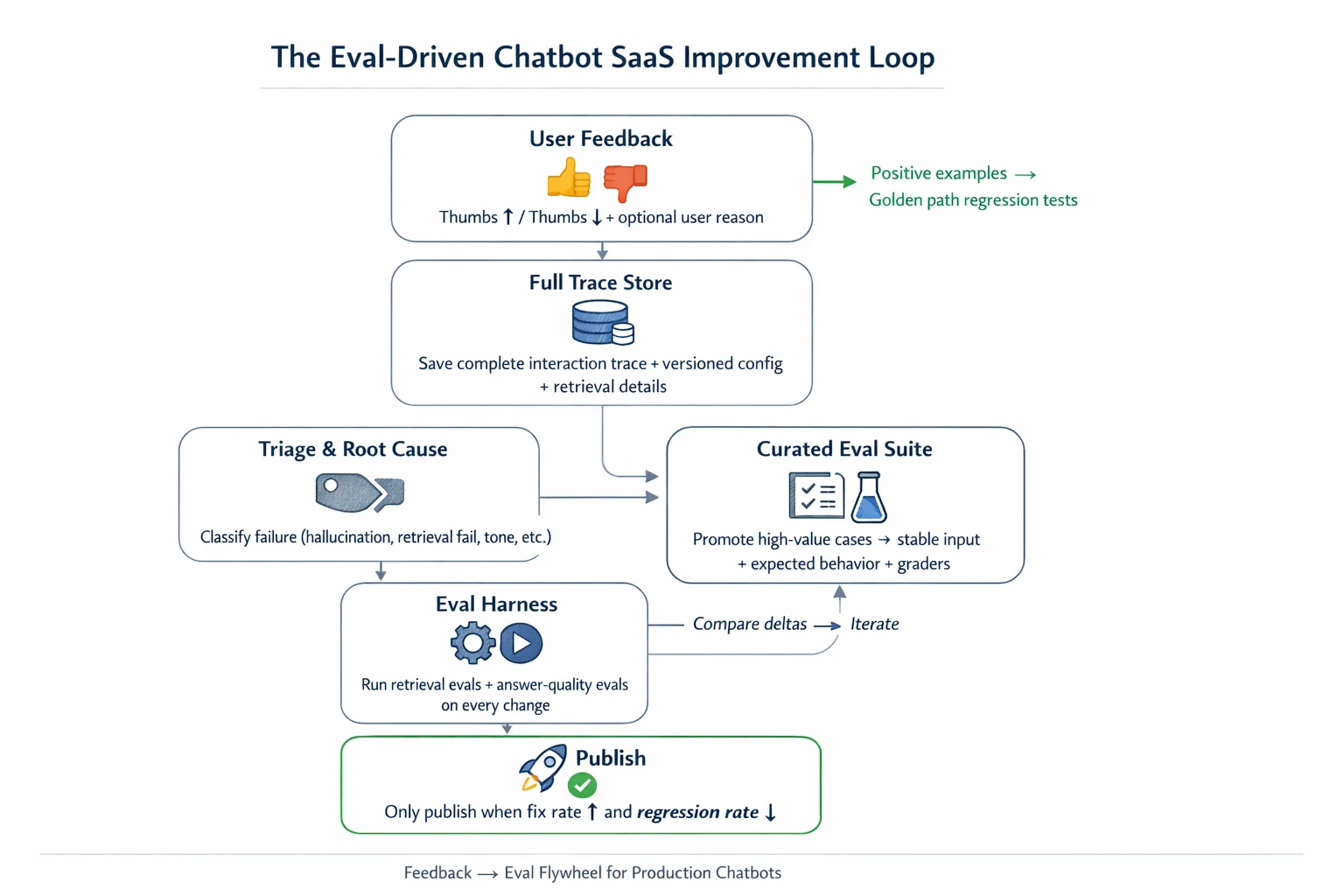
Building a chatbot SaaS product is not just about getting the first answer right. It is about building a system that keeps learning. The difference between a team that ships once and a team that compounds quality over time often comes down to one architectural decision: whether user feedback stays as support noise or becomes the raw material for a structured evaluation pipeline.
This post walks through a complete architecture for turning thumbs up and thumbs down signals into a production-grade improvement flywheel, from the feedback loop itself through database design, triage logic, and versioned eval suites.
At Predictable Dialogs, this is the approach we take to improve chatbot experiences across website and messaging use cases. An important extra benefit is that evals give support, product, and engineering one shared language for discussing quality, which makes iteration faster, calmer, and more trustworthy.
The Core Feedback Loop
Every chatbot SaaS improvement cycle follows the same five-step arc:
- Users configure the agent with instructions, knowledge bases, and model settings.
- Users interact with the agent in a playground or production environment.
- You collect explicit feedback on good and bad responses, usually through thumbs up and thumbs down.
- You inspect whether failures came from the prompt and instructions, retrieval pipeline, or model choice.
- You convert important examples into evals so future changes can be tested before rollout.
This maps cleanly to current eval best practices. Build task-specific evals, run them repeatedly because model behavior is variable, and use evals plus prompt changes as part of a continuous improvement flywheel. The strongest teams keep turning real failures into reproducible evaluations over time.
What Your Feedback Signals Should Actually Do
Most teams treat thumbs up and thumbs down like support tickets. They are more valuable than that. Used well, they become the raw material for a structured eval dataset.
Thumbs Down: Failure Candidates
A thumbs down should immediately become a candidate failure case in your eval dataset, not just a support alert. The critical nuance is simple: do not promote raw thumbs-down events directly into your long-term eval suite. The signal matters, but it is too noisy on its own.
A thumbs down can mean any of the following:
- The answer was factually wrong
- The answer was technically correct but not useful
- Retrieval missed a relevant document
- Tone was off
- The response was too long
- Latency was bad
- The user expected different product behavior
Only some of those belong in an eval, and they need to be normalized into a test case first.
Thumbs Up: Golden Path Regression Tests
Positive feedback matters too. It shows you which behavior is worth preserving. If a future prompt change fixes one failure but breaks something that previously worked, positive examples catch that regression before it ships.
The Failure Taxonomy: Why It Matters
Not every bad answer means you should rewrite the system prompt. In practice, bad outputs usually come from one of these buckets:
- Instruction or prompt quality
- Retrieval failure
- Poor source data, chunking, or metadata
- Model mismatch
- Missing guardrails
- The user asking something the bot should decline or answer with uncertainty
This decomposition matters because each failure type needs a different remediation path and often a different grader. When teams mix those failures together, it becomes much harder to tell whether a prompt change or a retrieval change caused the problem.
Key insight: When the knowledge-base pipeline changes, including chunk size, metadata, embeddings, reranking, or filters, rerun retrieval evals before you inspect answer-quality regressions. Attribute failures before you try to fix them.
A Better Feedback Pipeline: Four Stages
Stage 1: Store the Full Interaction Trace
For every rated message, save the complete context. You will need this later to understand whether a regression came from a prompt edit, a retrieval config change, a re-index, or a model swap.
For each trace, capture:
- User message
- System instructions version
- Model and provider
- Retrieved chunks, document IDs, and scores
- Final answer
- Conversation context, including previous turns or a summary
- Thumbs up or thumbs down rating
- Optional user free-text reason
- Agent and tool trace, if applicable
- Knowledge-base version, embedding version, and chunking strategy version
Stage 2: Triage Feedback into Failure Categories
Every negative example should be labeled into a root cause. This can be human-labeled, model-assisted, or both. The reason is straightforward: you need different fixes and different evals for each class.
Suggested failure categories:
- Hallucination or factual error
- Failed retrieval
- Incomplete answer
- Poor instruction following
- Bad formatting
- Unsafe answer
- Should have refused
- Tone or style issue
- Answerable only with missing knowledge
- Context drift, especially in long conversations
Stage 3: Promote Only High-Value Cases into Eval Tasks
A thumbs-down interaction becomes an eval item only after it is converted into a stable input, an expected behavior, and grading logic. That transformation is what turns a useful signal into a dependable test.
Example: from raw feedback to a structured eval
Raw feedback
- User asks: "What is your refund policy for annual plans?"
- Bot answers incorrectly.
- User gives a thumbs down.
Converted eval
- Input: user question plus relevant account or site context and the same knowledge-base slice
- Expected behavior: answer cites the correct annual refund rule from docs
- Graders: factual correctness, retrieval hit on the correct source, no invented policy, concise format
That is much stronger than simply saying a message got a thumbs down once.
Stage 4: Separate Retrieval Evals from Answer-Quality Evals
This is the single biggest architectural recommendation in the article. Run two distinct eval tracks:
- Response quality evals, which run on the final answer and measure correctness, completeness, instruction following, tone, style, refusal behavior, and format requirements.
- Retrieval evals, which run on the retrieval pipeline and measure whether the right chunks were retrieved, whether top-k contains the answer-bearing chunk, ranking quality, citation and source grounding, and whether retrieval is even needed for the question.
Eval Case Structure
For each promoted case, store a structured record with the following fields:
task_idcustomer_bot_idinput_messagesexpected_behaviorreference_answerif applicablemust_include, an array of required phrasesmust_not_include, an array of forbidden phrasesrelevant_docs, written as[{ fileId, snippet }]grader_types, for examplefactual_correctness,retrieval_hit,tonefailure_category, the root cause enumis_positive_example, the golden-path regression test flagseveritysource, such asuser_feedback,manual,synthetic, orsupport_ticketcreated_from_trace_id
Graders can then be mixed depending on the case: exact string checks for required phrases, semantic similarity for paraphrased correctness, model-based rubric grading for nuanced quality, and code checks for structured outputs or tool usage.
The Database Schema
The architecture above maps cleanly onto a Prisma schema. Below is the complete delta you can apply to an existing chatbot SaaS schema.
Design principles:
- Full trace capture: one-to-one
ChatTraceplus a dedicatedRetrievalEvent - Versioning: a clean
BotConfigVersionso every chat knows exactly what it ran against - Triage to eval promotion: a root-cause enum on
Chatplus anEvalCasemodel - Queryability: Postgres-friendly JSONB where needed, normalized where queried frequently
New Enums
enum FeedbackRootCause {
  HALLUCINATION
  FAILED_RETRIEVAL
  INCOMPLETE_ANSWER
  POOR_INSTRUCTION_FOLLOWING
  BAD_FORMATTING
  UNSAFE_ANSWER
  SHOULD_HAVE_REFUSED
  TONE_STYLE_ISSUE
  MISSING_KNOWLEDGE
  CONTEXT_DRIFT
  OTHER
}

enum EvalCaseStatus {
  DRAFT
  CURATED
  ACTIVE
  ARCHIVED
}

enum EvalCaseSource {
  USER_FEEDBACK
  MANUAL
  SYNTHETIC
  SUPPORT_TICKET
}
Chat Model Extensions
model Chat {
  // ... existing fields ...

  // Feedback triage
  feedbackRootCause   FeedbackRootCause?
  feedbackCorrectiveAnswer  String?
  feedbackSubmittedAt       DateTime?        @db.Timestamptz(3)

  // Trace references
  traceId             String?               @unique
  trace               ChatTrace?            @relation(fields: [traceId], references: [id])
  retrievalEventId    String?               @unique
  retrievalEvent      RetrievalEvent?       @relation(fields: [retrievalEventId], references: [id])

  // Config version at time of chat
  botConfigVersionId  String?
  botConfigVersion    BotConfigVersion?     @relation(fields: [botConfigVersionId], references: [id])

  @@index([chatSessionId, feedbackType])
  @@index([chatSessionId, feedbackRootCause])
  @@index([feedbackSubmittedAt])
}
ChatTrace Model
model ChatTrace {
  id                    String   @id @default(cuid())
  createdAt             DateTime @default(now()) @db.Timestamptz(3)
  updatedAt             DateTime @updatedAt @db.Timestamptz(3)

  chatId                String   @unique
  chat                  Chat     @relation(fields: [chatId], references: [id], onDelete: Cascade)

  modelUsed             String?
  provider              Provider?
  systemPromptSnapshot  String?
  systemPromptVersion   String?
  retrievalConfig       Json?
  kbVersion             String?
  chunkingStrategy      Json?
  embeddingVersion      String?
  fullAgentTrace        Json?
  conversationContext   Json?
}
RetrievalEvent Model
model RetrievalEvent {
  id            String   @id @default(cuid())
  createdAt     DateTime @default(now()) @db.Timestamptz(3)

  chatId        String   @unique
  chat          Chat     @relation(fields: [chatId], references: [id], onDelete: Cascade)

  query         String?
  vectorStoreId String?
  vectorStore   VectorStore? @relation(fields: [vectorStoreId], references: [id])
  topK          Int?
  threshold     Float?
  results       Json?    // [{ fileId, score, rank, snippet, metadata }]
  hitCount      Int?

  @@index([chatId])
  @@index([vectorStoreId, createdAt])
}
BotConfigVersion Model
model BotConfigVersion {
  id                String   @id @default(cuid())
  createdAt         DateTime @default(now()) @db.Timestamptz(3)

  botId             String
  bot               Bot      @relation(fields: [botId], references: [id], onDelete: Cascade)

  version           String   @unique
  instructions      String?
  model             String?
  temperature       Float?
  retrievalSettings Json?
  kbConfig          Json?
  settingsSnapshot  Json?
  configHash        String?  @unique  // prevents duplicate versions

  chats             Chat[]
  evalCases         EvalCase[]

  @@index([botId, version])
}
EvalCase Model
model EvalCase {
  id                  String            @id @default(cuid())
  createdAt           DateTime          @default(now()) @db.Timestamptz(3)
  updatedAt           DateTime          @updatedAt @db.Timestamptz(3)

  organizationId      String
  organization        Organization      @relation(fields: [organizationId], references: [id])
  agentId             String?
  agent               Agent?            @relation(fields: [agentId], references: [id])
  botId               String?
  bot                 Bot?
  botConfigVersionId  String?
  botConfigVersion    BotConfigVersion? @relation(fields: [botConfigVersionId], references: [id])
  sourceChatId        String?
  sourceChat          Chat?             @relation(fields: [sourceChatId], references: [id])

  input               Json
  expectedBehavior    String?
  referenceAnswer     String?
  mustInclude         Json?
  mustNotInclude      Json?
  relevantDocs        Json?
  graderTypes         Json?
  failureCategory     FeedbackRootCause?
  isPositiveExample   Boolean           @default(false)
  severity            Int               @default(1)
  source              EvalCaseSource    @default(USER_FEEDBACK)
  status              EvalCaseStatus    @default(DRAFT)
  clusterKey          String?

  @@index([organizationId, status])
  @@index([sourceChatId])
  @@index([botConfigVersionId])
}
How the Schema Maps to the Architecture
| Requirement | Schema Implementation |
|---|---|
| Store full interaction trace | ChatTrace + RetrievalEvent + botConfigVersionId on Chat |
| Thumbs up and thumbs down plus user reason | Existing feedbackType + new feedbackUserReason on Chat |
| Triage into failure categories | feedbackRootCause + triageCompleted on Chat |
| Promote high-value cases to evals | EvalCase created from sourceChatId with input, expectedBehavior, and graders |
| Versioned bot configs | BotConfigVersion with instructions, model, retrieval, and knowledge-base state |
| Separate retrieval vs answer evals | RetrievalEvent is completely independent from ChatTrace |
| Fix rate and regression rate | Query EvalCase + Chat feedback before and after BotConfigVersion change |
| Candidate dataset to curated suite | EvalCase status moves from DRAFT to CURATED to ACTIVE |
A SaaS-Grade Architecture: Five Layers
1. Production Feedback Store
Every rated interaction is saved with full metadata. This is the raw material for everything downstream.
2. Candidate Dataset
A queue of interactions that may become evals. EvalCase records with status: DRAFT live here.
3. Curated Eval Suite
A smaller, high-quality dataset of EvalCase records with status: CURATED or ACTIVE, covering:
- Happy path and core business questions
- Common user questions
- Critical business-policy questions
- Known historical failures
- Edge cases and adversarial inputs
- Refusal and safety cases
4. Versioned Bot Configs
Each BotConfigVersion captures a snapshot of instruction version, model version, retrieval config, knowledge-base snapshot, and tool settings. A deterministic configHash prevents duplicate versions from being created.
5. Eval Harness
On every meaningful change, run:
- Smoke evals on core tasks
- Regression evals on historical failures
- Retrieval evals if the knowledge base or search configuration changed
- Safety and refusal evals if instructions changed
The End-to-End Workflow
In production:
- User chats with the bot.
- User rates the response.
- System saves the full trace and metadata, linking
BotConfigVersion.
In review:
- Cluster failures by root cause and frequency.
- Classify root cause with human triage or LLM-assisted labeling.
- Select high-value examples for promotion.
In curation:
- Convert chosen examples into
EvalCaserecords. - Add
expectedBehavior,referenceAnswer,mustInclude,mustNotInclude, andgraderTypes. - Mark
statusasCURATEDonce complete.
In iteration:
- User edits prompt, knowledge base, or model, creating a new
BotConfigVersion. - System runs the eval suite against the new config automatically.
- Compare pass and fail deltas against the previous config version.
- Show improvements and regressions before publishing.
- Publish only when the results are acceptable.
The One Thing You Should Not Do
Do not let customers directly mutate the system prompt and trust the playground result. Instead, when they edit instructions or change knowledge-base settings, run a small internal eval set automatically, show them what improved, show possible regressions, and then let them publish.
Product feature opportunity: "Your update improved 7 known failures, but 2 billing-policy answers regressed." That is a powerful differentiator, and it is only possible with a structured eval suite.
Recommended Scoring Model
For each bot version, report at least these metrics:
- Overall pass rate
- Critical-question pass rate
- Retrieval hit rate
- Hallucination rate
- Refusal correctness
- Positive-example preservation rate, which is your regression rate
- Negative-example fix rate
The two most actionable product metrics are the fix rate on prior thumbs-down cases and the regression rate on prior thumbs-up cases. These make the improvement loop easy for customers to understand and trust.
Implementation Notes
When a user rates a message:
- Create or update a
ChatTraceandRetrievalEvent. - Link the
BotConfigVersion. Create a new one only when the config actually changed, usingconfigHashfor deduplication. - Set
feedbackRootCauseandtriageCompletedduring the review stage.
Trace cost and scale: Traces are created for rated messages by default. You can expand to all assistant messages for full coverage and add a retention policy later. The new indexes are placed where teams will query for dashboards and eval runs.
Conclusion
The difference between a feedback collection feature and a real eval-driven platform comes down to a repeatable pipeline: collect signals, store full traces, classify root cause, promote selected cases into curated eval tasks, separate retrieval evals from answer-quality evals, run those evals on every config change, and track both fixed failures and new regressions.
The schema and architecture described here give you all of that while staying inside an existing data model.
FAQ
What makes an eval-driven chatbot platform different from a basic feedback dashboard?
An eval-driven platform turns user feedback into structured test cases, curated suites, and release checks instead of leaving feedback as isolated support signals.
Should every thumbs-down rating become an eval case?
No. A thumbs-down rating should become a candidate case first, then be triaged, normalized, and promoted only if it represents a stable and important behavior to test.
Why should retrieval evals and answer-quality evals stay separate?
They diagnose different failures. Separate eval tracks help teams see whether a problem came from search, context selection, or answer generation.
What should a full chatbot interaction trace include?
A strong trace includes the user message, instructions version, model, retrieved chunks, final answer, conversation context, feedback signal, and knowledge-base version details.
How do versioned bot configs help teams ship safely?
Versioned configs let teams compare old and new behavior before release, measure regressions, and publish changes with much more confidence.
How does Predictable Dialogs apply this approach?
Predictable Dialogs uses this eval-driven mindset to improve chatbot quality through real conversation feedback, structured triage, and safer iteration before changes go live.