- Published on
AI to Human Consultation Layer
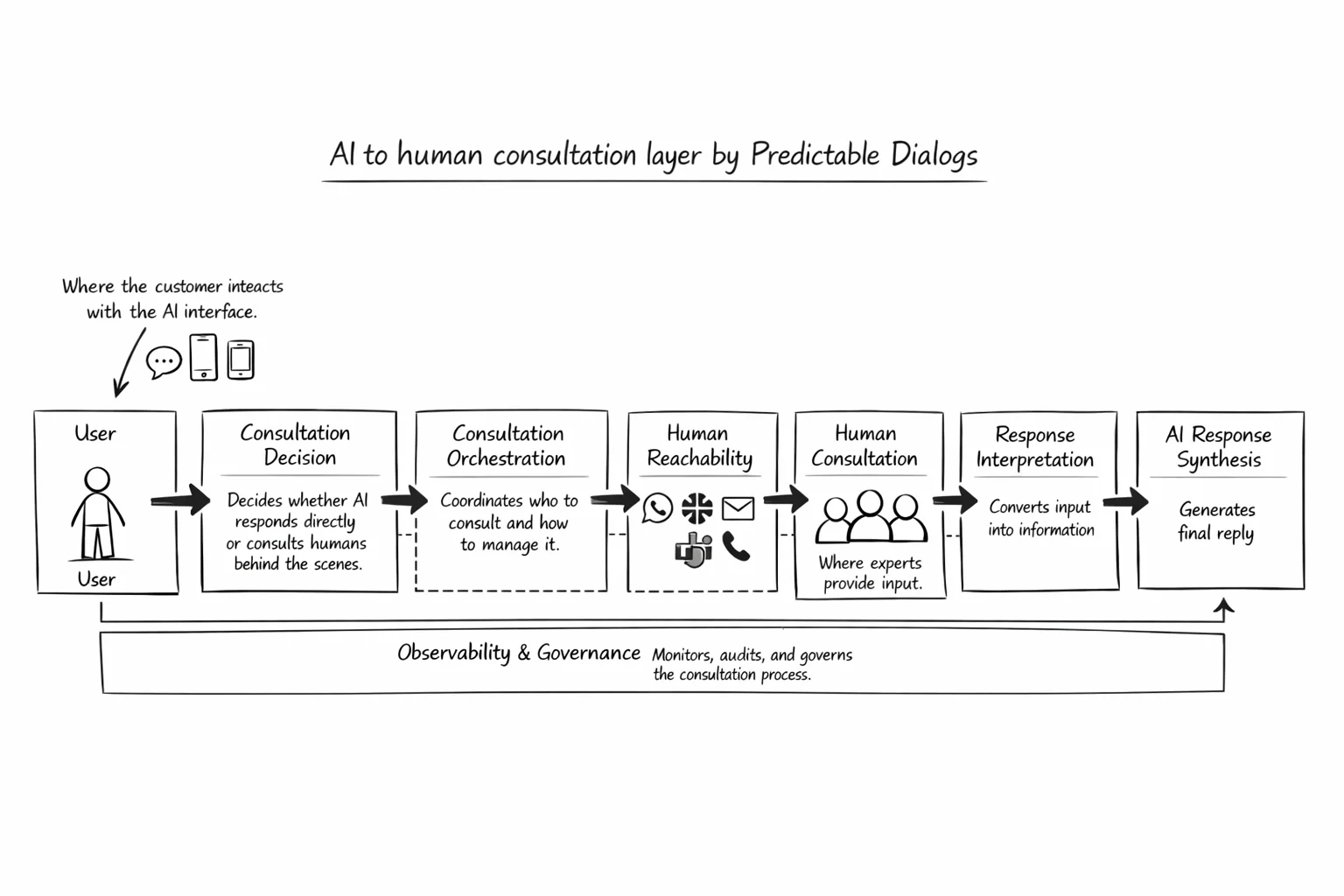
This architecture enables AI agents to stay as the main customer-facing interface while consulting humans in the background whenever judgment, approval, or missing context is needed. Instead of handing the conversation off, AI coordinates expert input and delivers a continuous experience for the user.
AI support flows often use human handoff when AI cannot resolve a request. The conversation moves from AI to a human agent, and continuity breaks for the user.
The AI to Human Consultation Layer uses a more resilient model. AI stays in the conversation and consults people only when human expertise is truly required.
In this model, AI remains the primary interface. Humans contribute guidance, approval, and domain judgment in the background. The user experience stays consistent, clear, and connected.
This is how teams combine automation with human care, without sacrificing quality.
Core Idea
This system is not designed as human handoff. A handoff model means the AI exits and the human becomes the interface.
The consultation model is different:
AI owns the conversation with the user and consults one or more humans in the background for clarification, approval, judgment, or expertise.
The user stays in one continuous conversation with AI. The human is a consulted expert, not a replacement interface.
Why This Matters
Traditional handoff is mostly routing logic. If a trigger condition is met, the system forwards the conversation to a person through WhatsApp, Telegram, email, or another channel.
Consultation creates a higher-value workflow because AI must:
- Understand when consultation is needed
- Identify who should be consulted
- Choose the best channel
- Gather the missing input from the human
- Interpret the human response
- Convert that input into a high-quality user answer
That is where AI adds meaningful operational value.
System Principle
The architecture follows one core principle:
AI remains the primary conversational layer. Humans are consulted as expert backends, not exposed as default frontends.
This distinction shapes product strategy and technical design.
High-Level Architecture
1. User Interaction Layer
This layer is where the customer interacts with AI.
Possible channels:
- Chat widget
- Mobile app
- Web app
- Voice assistant
AI receives the user request, preserves context, and attempts direct resolution.
Responsibilities:
- Conversation management
- Context tracking
- User intent understanding
- Response generation
- Consultation trigger detection
2. Consultation Decision Engine
This layer decides whether AI continues independently or consults a human.
It evaluates signals such as:
- Low answer confidence
- Policy-based restrictions
- Negative sentiment
- Explicit user dissatisfaction
- High-value or high-risk conversation types
- Approval-required workflows
- Missing business context not available in system data
Output paths:
- AI resolves directly
- AI consults a human in the background
- Full human takeover is required for rare cases
Consultation remains the default pattern, not handoff.
3. Consultation Orchestrator
This is the operational core of the architecture.
Once consultation is triggered, the orchestrator reaches the right human, collects input, and routes it back to AI.
Responsibilities:
- Identify the right human or team
- Select channel strategy
- Manage escalation sequence
- Track response timeouts
- Normalize replies across channels
- Maintain audit trail
- Return structured consultation output to AI
This layer supports both fixed workflows and AI-guided dynamic workflows.
4. Human Reachability Channels
These are the mechanisms used to consult humans.
Examples:
- Telegram
- Slack or Teams
- Phone call, voice bot, or IVR
- Internal dashboard
- Mobile push notification
The architecture treats these as interchangeable consultation endpoints.
Possible strategies:
- Send to one channel
- Send to multiple channels and accept first response
- Try channels in sequence with configurable wait times
- Escalate from text to voice when needed
This area is usually orchestration logic.
5. Human Consultation Interface
This is the interface used by the consulted expert.
It should provide:
- Summary of the user issue
- Relevant conversation context
- Focused question from AI
- Suggested response options when available
- Response modes such as free text, structured form, or approval action
- Urgency and SLA indicators
The human should not need to review the full conversation unless necessary. AI should summarize the situation clearly.
6. Response Interpretation Layer
Human replies can be incomplete, ambiguous, or unstructured. This layer converts those responses into reliable AI input.
Responsibilities:
- Parse human replies
- Extract decisions, facts, and approvals
- Detect ambiguity
- Ask follow-up questions when needed
- Map output into structured consultation data
Example output:
- Consultation status
- Answer provided
- Confidence signal
- Approval flag
- Escalation recommendation
- Audit notes
AI is highly useful in this layer.
7. AI Response Synthesis Layer
Once human input is available, AI generates the user-facing response.
AI should:
- Preserve conversation continuity
- Translate internal guidance into clear user language
- Avoid exposing internal workflow complexity unless needed
- Ask follow-up questions when consultation remains incomplete
The user should experience one coherent conversation.
8. Observability and Governance Layer
Because consultation often affects quality, compliance, and responsiveness, this system needs robust monitoring and controls.
Track:
- Consultation trigger reasons
- Who was consulted
- Which channels were used
- Response times by channel and person
- Consultation success rate
- Fallback handoff rate
- User satisfaction after consultation
- Resolution quality
Governance needs:
- Audit logs
- Role-based access
- Privacy controls
- Retention rules
- Regulated workflow handling
- Policy override rules
Example Modes
Below are practical consultation modes. Teams can define many variants based on business needs.
Mode 1: Fixed Consultation
A fixed rule sends consultation to one person through one channel.
Example:
- Consult XYZ on WhatsApp
Mode 2: Fixed Consultation with Multi-Channel Reach
A fixed rule tries the same person across multiple channels.
Example:
- Consult XYZ on WhatsApp
- Wait 3 minutes if no response
- Consult on Telegram
- Wait 3 minutes if no response
- Trigger a voice call
This mode is helpful and mostly procedural.
Mode 3: AI-Assisted Consultation
This is where AI adds operational intelligence.
Example:
- AI identifies a billing issue with high urgency
- AI selects a finance operations expert instead of general support
- AI summarizes the issue in one paragraph
- AI asks a focused consultation question
- AI interprets the reply and responds to the user
Mode 4: AI-Led Multi-Human Consultation
For complex cases, AI can consult multiple experts.
Example:
- One expert for policy approval
- Another expert for technical feasibility
- AI merges both inputs
- AI delivers one final answer to the user
This is AI-mediated human consultation in action.
Trigger Types for Consultation
The consultation engine supports multiple trigger categories.
1. Knowledge Gap Trigger
AI does not have enough confidence in the answer.
2. User Dissatisfaction Trigger
The user rejects the answer or expresses frustration.
3. Approval Trigger
A human approval is required for refunds, exceptions, discounts, or policy overrides.
4. Context Gap Trigger
The answer depends on information not present in current systems or knowledge sources.
5. Risk Trigger
Legal, financial, healthcare, or compliance-sensitive situations require human judgment.
6. Business Priority Trigger
The case involves a VIP customer, churn risk, or high-value transaction.
Consultation Flow
A clean consultation flow looks like this:
- User asks a question
- AI attempts resolution
- Decision engine detects consultation need
- AI formulates consultation request
- Orchestrator selects human and channel
- Human receives summary and responds
- Interpretation layer structures response
- AI synthesizes final answer
- User receives response from AI
- System logs the event for analytics and governance
Recommended Conceptual Components
A practical implementation can define these services:
- Conversation Service: Manages user and AI interaction
- Consultation Trigger Service: Determines when consultation is needed
- Consultation Orchestrator: Runs the consultation workflow
- Human Directory Service: Maps issue types to roles, teams, availability, and escalation paths
- Channel Gateway: Sends and receives messages through external channels
- Consultation Context Builder: Summarizes and packages the issue for the human
- Human Reply Interpreter: Parses and structures human responses
- Response Composer: Generates the final AI response to the user
- Audit and Analytics Service: Logs events, outcomes, SLAs, and quality metrics
This architecture helps organizations deliver a future-ready support model where AI and humans collaborate with clarity, speed, and accountability.
Frequently Asked Questions
What is the AI to Human Consultation Layer?
It is an architecture where AI remains the customer-facing interface and consults humans in the background when additional judgment, approval, or context is needed.
How is consultation different from human handoff?
In handoff, a human takes over the conversation. In consultation, AI remains with the user and brings in human expertise behind the scenes.
When should the system trigger consultation?
Consultation is triggered when confidence is low, approval is required, risk is high, or critical context is missing.
Does this approach still include full human takeover?
Yes. Full takeover remains available for rare cases where policy, safety, or complexity requires direct human conversation.
What channels can be used to reach experts?
Teams can use WhatsApp, Telegram, email, Slack, Teams, voice calls, internal dashboards, and mobile notifications.
What does the consulted human need to see?
They need a concise issue summary, relevant context, a focused question, urgency details, and a simple response method.
What happens if a human doesn't respond quickly?
The orchestrator can retry, switch channels, escalate by priority, and apply policy-based fallback actions.
Why is this model important for scaling support?
It helps AI handle routine conversations while humans focus on high-impact judgment, which improves quality and responsiveness at scale.