- Published on
What Multi-Source, Tool-Using Chatbots Can Do
- Authors

- Name
- Jai
- @jkntji
Most chatbots start with one simple job: answer questions from a knowledge base.
That is useful, but many real customer conversations are not that simple. A user may ask a product question, reveal a support issue, mention buying intent, need account-specific data, and ask to book a call - all in the same conversation.
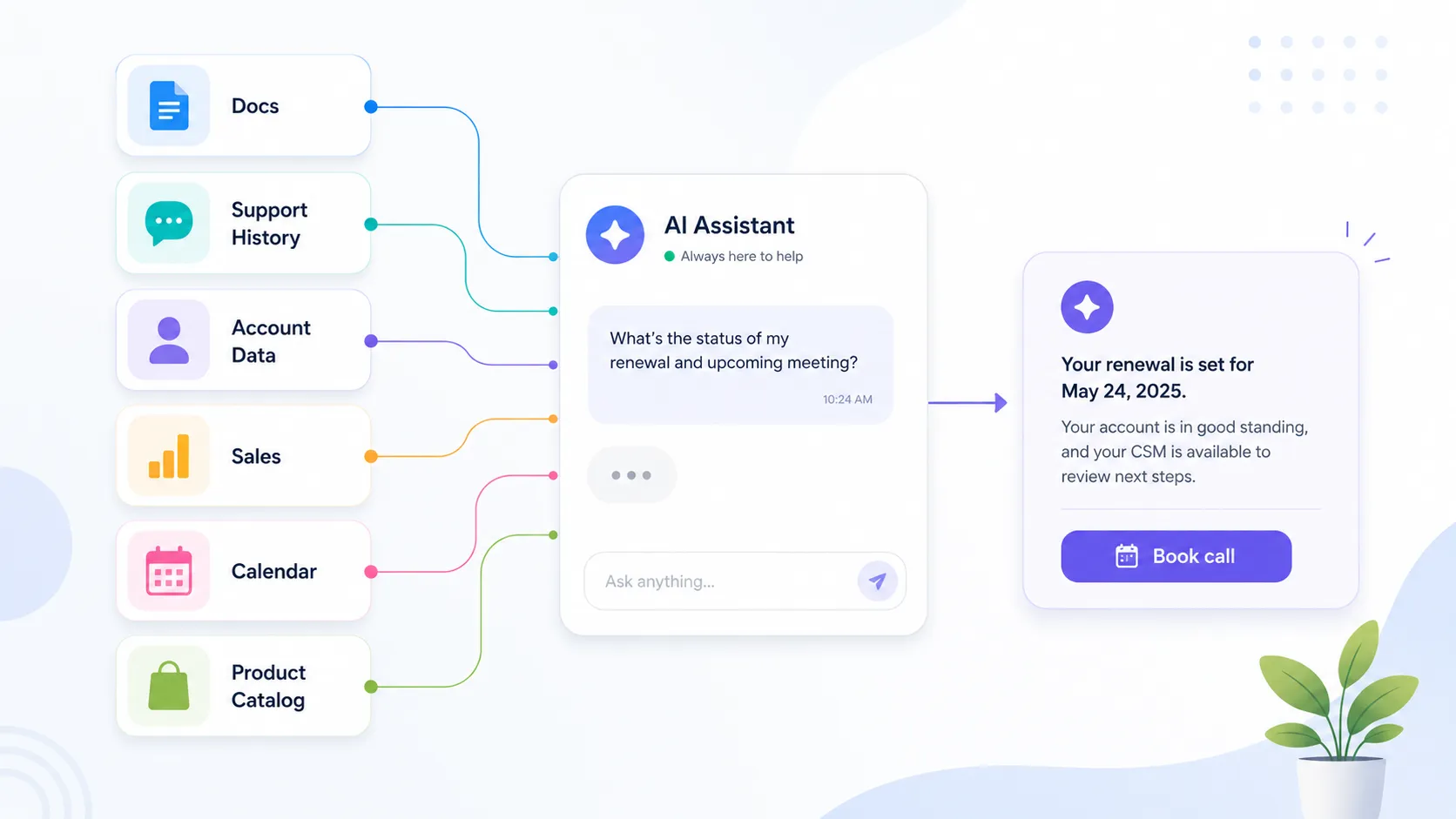
This is where chatbots become more interesting. Instead of only searching one set of documents, a chatbot can use multiple knowledge sources, call backend endpoints, connect to Google Calendar, and switch between different skills.
The user still gets one clear reply. The difference is that the bot can do more work before it answers.
The Big Shift: From One Answer Source to a Workflow
A traditional knowledge-base bot usually follows this pattern:
- User asks a question.
- Bot searches one knowledge base.
- Bot replies.
The next generation of workflows looks more like this:
- User asks a question.
- Bot decides which knowledge source or tool is relevant.
- Bot checks product docs, support history, backend data, sales content, or calendar availability.
- Bot combines the useful pieces.
- Bot replies with one answer and, when appropriate, one next step.
The point is not to make the conversation feel more complex. The point is to make the answer more useful while keeping the user experience simple.
What These Features Unlock
Here are some practical workflows this kind of chatbot can support.
1. Answer From Official Docs and Real-World Support History
Product documentation usually tells the bot what is officially supported.
Support history shows what actually tends to go wrong.
When those sources are combined, the bot can give a better answer.
For example, a customer asks:
I forgot to cancel before my renewal yesterday. Can I still get a refund?
The official billing policy may say:
Renewals are non-refundable once the new billing cycle starts.
Support history may show:
Customers who contact support within 48 hours, have not used the product after renewal, and have no prior refund exceptions are often reviewed for a one-time courtesy refund.
The bot can then reply:
Officially, renewals are non-refundable once the new billing cycle starts. In practice, because your renewal happened yesterday, support may be able to review it for a one-time courtesy refund if you have not used the product since renewal. I can help you contact support with the relevant details.
That is a better answer because it combines the official policy with the practical pattern support teams already apply.
2. Add a Sales Link Only When the Conversation Is Eligible
Sales nudges are useful only when the timing is right.
If a customer is reporting a broken workflow or a billing issue, the bot should focus on helping. If the customer is asking about a product, plan, upgrade, or add-on, a relevant link can be helpful.
For example, a shopper asks:
Is this mirrorless camera good for travel photography?
The bot can answer from the product catalog:
Yes. It is lightweight, has in-body stabilization, and supports 4K video, so it is well suited for travel.
Then, if the conversation is eligible for a sales suggestion, the bot can check a separate sales or merchandising source and add:
For travel photography, you may also want to consider a spare battery, 128 GB memory card, and compact camera bag.
This is not pushing a more expensive camera. It is recommending useful complementary products.
The same pattern works for other industries:
- Answer a product question.
- Detect plan or upgrade interest.
- Add a relevant pricing, demo, or onboarding link only when it makes sense.
3. Call Your Backend for Live or Customer-Specific Data
Some answers cannot come from documents.
A bot may need live data from your own system:
- Account plan
- Order status
- Subscription state
- Product inventory
- Customer profile
- Support ticket status
- Usage limits
- Eligibility for an offer
For example, a customer asks:
Can I use the integration on my current plan?
The bot may need two sources:
- Product docs to explain which plans include the integration.
- Your backend to check the customer's current plan.
The answer becomes specific:
The integration is available on the Pro plan and above. Your account is currently on Starter, so you would need to upgrade before using it.
This is much more useful than a generic answer.
4. Book a Follow-Up Call From the Same Chatbot
Some conversations naturally lead to a meeting.
A support question may need a technical follow-up. A sales question may need a demo. An onboarding question may need a guided setup session.
With a calendar integration, the chatbot can move from answering to scheduling.
For example:
I tried the setup steps, but I still cannot connect the integration.
The bot can:
- Search troubleshooting docs.
- Ask for the missing detail.
- If the issue is still unresolved, check available calendar slots.
- Help book a support call.
The customer does not need to leave the conversation to find a booking link.
5. Personalize Recommendations With Profile and Product Data
Some workflows need both product knowledge and user context.
For example, a running shoe store could use:
- Product catalog data
- Runner reviews
- Returns and support trends
- The shopper's running profile
A shopper asks:
Are these shoes good for me as a beginner training for a 10K? I slightly overpronate and sometimes get knee pain.
The bot can combine:
- Official shoe specs, such as stability support and cushioning.
- Review trends from beginner runners.
- Return patterns from neutral runners versus overpronators.
- The shopper's profile and training goal.
The final answer can be personalized:
This looks like a good match for a beginner training for a 10K, especially if you slightly overpronate. Reviews suggest beginners like it for comfort and support. Since you mentioned knee pain, the stability and cushioning may help reduce strain linked to overpronation, but they cannot guarantee injury prevention. If pain continues, check with a running specialist or physiotherapist.
This is not just product Q&A. It is buying guidance grounded in multiple sources.
6. Let One Bot Switch Between Skills
In many businesses, one chatbot should handle more than one kind of task.
For example:
- Answer a support question.
- Check backend account data.
- Suggest a relevant next step.
- Book a meeting.
- Collect a lead.
- Route a user to the right team.
Skills make this easier. Instead of creating a separate bot for every task, one chatbot can switch context based on what the user is trying to do.
A user may begin with:
How do I connect my account?
Then continue with:
It still does not work.
Then ask:
Can someone walk me through it?
The bot can start with support knowledge, move into troubleshooting, and then use calendar availability to book a follow-up.
That is the kind of workflow we want to make easier to configure.
A Few Workflow Ideas
Here are some examples you can adapt:
| Workflow | What the bot does |
|---|---|
| Support plus backend data | Answers a support question, checks account status, and gives account-specific guidance. |
| Support plus calendar | Troubleshoots first, then books a follow-up call if needed. |
| Product Q&A plus sales link | Answers from product docs, then adds a relevant sales link only when the conversation qualifies. |
| HR plus policy plus compliance | Combines company policy with legal or compliance references before answering. |
| Onboarding assistant | Guides setup, checks integration status, and books help if the user gets stuck. |
| Renewal assistant | Answers plan questions, checks account context, and suggests renewal or upgrade options. |
| E-commerce advisor | Combines catalog data, reviews, return trends, and shopper profile to recommend a product. |
These examples are not the full list. They are meant to show the shape of what becomes possible.
What We Want to Learn From Users
The important question is not which policy setting sounds interesting.
The important question is:
What workflow would you want your chatbot to handle?
A useful answer can be simple:
I want a bot that can answer a pricing question, check whether the visitor is a good sales lead, and if needed offer a link to book a demo.
Or:
I want a bot that can answer a support question, check the customer's account status, and if needed book a follow-up call.
Or:
I want a bot that can search HR policy, check legal guidance, and tell a manager what approval is needed.
That is the kind of use case we would love to hear about.
The Simplest Way to Think About It
If your current chatbot answers from one source, the next step is a chatbot that can coordinate sources and actions.
It can know where to look. It can know when to call a tool. It can know when to stay quiet. It can know when a follow-up action is useful.
The goal is not to make the bot more complicated for users. The goal is to make it more useful while keeping the conversation natural.