- Published on
User Configurable RAG Workflows
- Authors

- Name
- Jai
- @jkntji
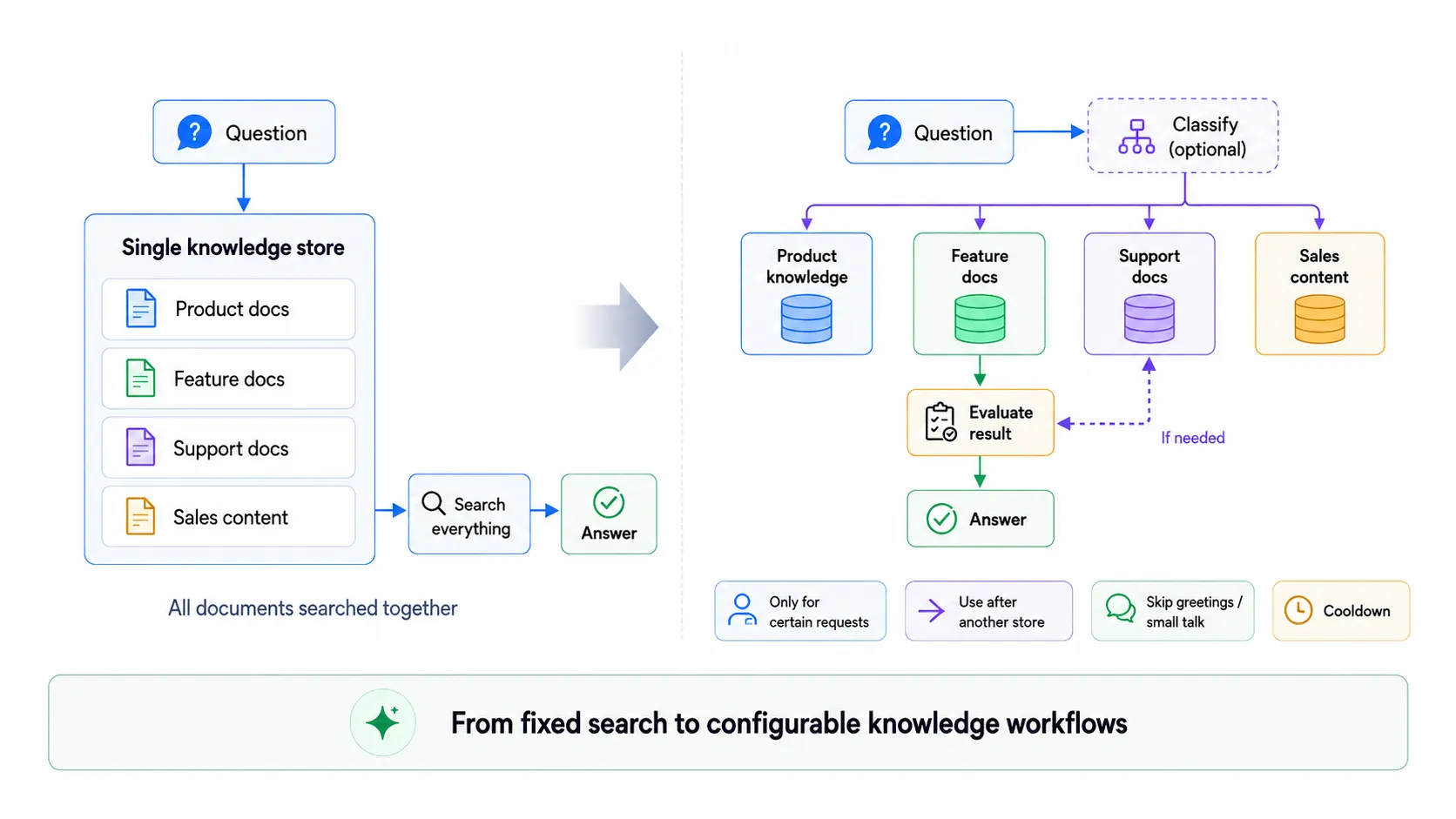
Traditionally, a RAG flow looks like this:
Question -> search everything -> return chunks -> answer.
That works when the knowledge base is small and uniform. Once the amount of knowledge grows, searching everything for every question is rarely the best approach. Teams end up either accepting noisy results or writing custom orchestration code just to decide which documents to search, when to search them, and when to skip retrieval entirely.
Predictable Dialogs now turns that orchestration into a configurable platform capability. Users can define knowledge retrieval as a workflow, choosing which stores to search, under what conditions, what should happen if a search succeeds or fails, and when retrieval should be skipped, without writing application code.
Until now, a chatbot could use only a single knowledge store. That store could contain multiple documents, including product docs, feature docs, support content, and more, and retrieval was already configurable in several ways: chunk size and overlap, maximum results, and similarity threshold. This was sufficient when everything could reasonably be searched together. As knowledge grows, however, better separation and conditional logic become essential.
We have upgraded Predictable Dialogs to support multiple knowledge stores for a single chatbot. More importantly, each store can now have its own rules that determine when it should, and should not, be searched.
Better Separation of Knowledge
The first advantage is straightforward: cleaner organization.
Instead of putting product documentation, feature documentation, and support documentation into one store, you can create separate stores:
- Product knowledge
- Feature documentation
- Support documentation
- Sales content
Each store stays independent and still retains the original retrieval settings, including chunk size, overlap, max results, and similarity threshold. Document management becomes cleaner, but the real gain is that each store can now carry its own retrieval logic.
Controlling When a Store Should Be Used
After creating multiple stores, you do not have to add any rules. A store can simply remain available. When more control is needed, Predictable Dialogs provides eligibility conditions that decide when a store becomes searchable.
There are two main eligibility conditions.
Only for Certain Requests
A store can be limited to specific kinds of questions via a classifier.
Example: three stores for Chapter 1, Chapter 2, and Chapter 3. The Chapter 1 store carries a classifier that identifies questions about Chapter 1. Only when the user's question matches does that store become eligible. The same pattern can be applied independently to every store.
Use This After Another Item
A store can depend on another store.
You might configure Chapter 3 to run only after Chapter 2 has already been searched, and you can further condition it on the result of that search:
- after the previous store succeeds,
- after the previous store does not succeed,
- or simply after the previous store has been used.
Retrieval starts to behave like a controlled workflow rather than a set of independent searches.
Combining Eligibility Conditions
When both a classifier and a dependency are present, you choose how they interact:
- both conditions must be true (AND), or
- either condition is true (OR).
Examples:
"Search Chapter 2 only when the question is about Chapter 2 and Chapter 1 did not return a satisfactory result."
or
"Search Chapter 2 when the question is about Chapter 2 or Chapter 1 did not return a satisfactory result."
These produce very different strategies; the choice is yours.
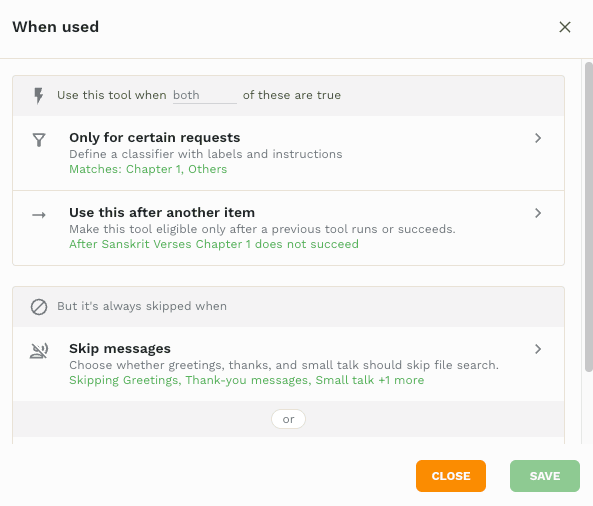
These rules control eligibility. A second, stronger group of rules can still block a search even when eligibility is satisfied.
Conditions That Always Prevent a Search
Under "But it's always skipped when" you will find two overrides.
Skip Messages
Many conversational turns, including greetings, thank-yous, acknowledgements, and small talk, do not need a knowledge search. An inbuilt classifier identifies these low-value messages. You choose which categories to skip; the rules are enabled by default for the common cases where retrieval would add little value.
Do Not Use This Too Often
A cooldown lets you specify that a store may not run again until a certain number of messages have passed, for example, once every 10 to 15 messages.
This came from a real requirement: a team wanted the bot to surface a sales link occasionally, but never repeatedly. A prompt alone, such as "show the sales link occasionally," is unreliable; a cooldown makes the frequency deterministic at the application level. Combined with the prompt, it keeps the conversation from becoming overly sales-focused.
How the Two Groups Work Together
- Eligibility: Classifier AND/OR Dependency
- Overrides: Skip Message OR Cooldown
Overall logic:
Use the store when its eligibility rules are satisfied, unless one of its skip conditions is active.
Users can therefore define sophisticated retrieval behavior without writing code.
Example: Searching a Large Book
Imagine a chatbot built around a ten-chapter book. Instead of one giant store, create ten stores, one per chapter, each with its own classifier describing the topics of that chapter. A question about Chapter 2 triggers only the Chapter 2 store; the other nine are never searched. Search space shrinks and control increases.
When information might live in more than one place, such as a topic that could appear in Chapter 2 or Chapter 3, search Chapter 2 first, then configure Chapter 3 with a dependency:
"Use Chapter 3 if Chapter 2 does not return a satisfactory result."
The path becomes:
Search Chapter 2 -> evaluate -> search Chapter 3 only if necessary.
The same pattern applies to product documentation, support content, policies, sales material, internal docs, and any knowledge that can be logically partitioned.
From Fixed RAG Search to Configurable Knowledge Workflows
With multiple stores, classifiers, dependencies, AND/OR logic, skip rules, and cooldowns, Predictable Dialogs lets users decide:
- which knowledge should be searched,
- when it should be searched,
- what should happen if a search succeeds or fails,
- and when retrieval should be skipped entirely.
RAG is no longer a fixed search mechanism; it becomes a user-configurable knowledge workflow. When that orchestration is already available as a platform capability, building the same logic from scratch becomes increasingly hard to justify. Teams can spend less time implementing and maintaining RAG infrastructure and more time designing the knowledge experience their users actually need.
FAQs
What are user-configurable RAG workflows?
User-configurable RAG workflows let chatbot builders decide which knowledge stores should be searched, when they should run, what happens after success or failure, and when retrieval should be skipped.
Why use multiple knowledge stores instead of one?
Multiple knowledge stores keep product docs, support content, sales material, policies, or chapter-based content separated so each store can have its own retrieval settings and rules.
How do eligibility conditions work?
Eligibility conditions decide whether a store can be searched. A store can be limited to certain requests with a classifier, made dependent on another store, or configured with AND/OR logic when both conditions exist.
What is the difference between eligibility rules and skip rules?
Eligibility rules decide when a store is allowed to run. Skip rules are stronger overrides that prevent retrieval even when eligibility is satisfied, such as small-talk skips or cooldowns.
How can dependencies improve retrieval?
Dependencies let one store run only after another store has succeeded, failed, or simply been used, which helps teams build fallback and progressive search paths without custom code.
When should I use cooldowns on knowledge stores?
Use cooldowns when a store should appear only occasionally, such as sales links or promotional content, so the chatbot does not repeatedly surface the same type of information.