- Published on
From Tool Calls to Generative UI: Letting AI Agents Control the Application Experience
- Authors

- Name
- Jai
- @jkntji
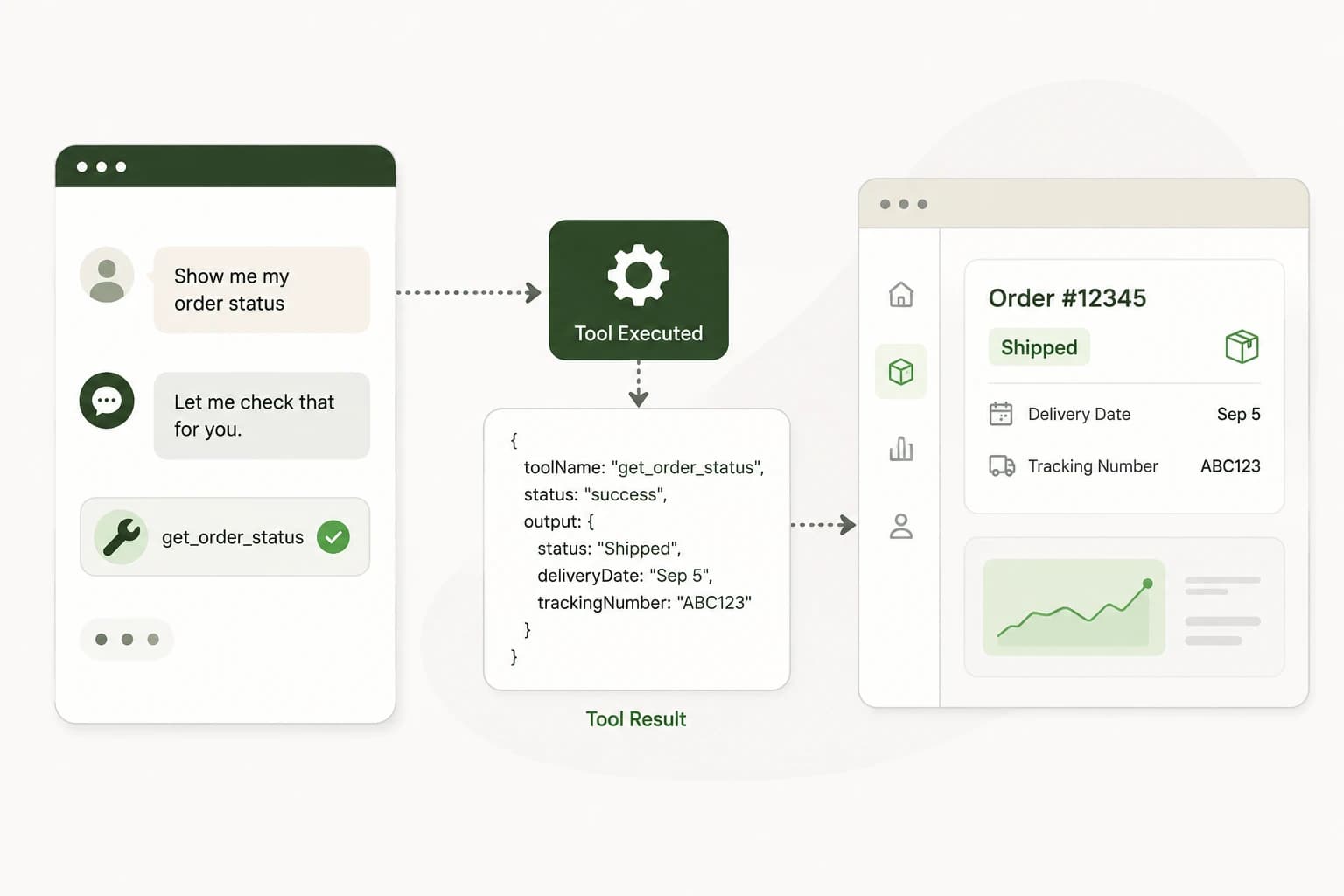
Most AI chatbots follow a simple loop:
User asks something
AI responds with text
Tools make that loop more powerful:
User asks something
AI calls a tool
Tool returns data
AI responds with text
But a more interesting step appears when the application hosting the chatbot can receive the result of that tool call:
User asks something
AI calls a tool
Tool returns data
The application reacts
That last step changes what a chatbot can be.
Predictable Dialogs chat widgets can expose completed tool results directly to the application where the chatbot is embedded. The tool call does not have to end with the assistant simply explaining what happened. The surrounding application can use the result too.
It can render a component, refresh data, run JavaScript, call another endpoint, navigate, or update state.
The chatbot becomes part of the application's control flow.
Define the Tool in Predictable Dialogs
Predictable Dialogs already lets you define tools an AI agent can use. A tool might call a custom API, check calendar availability, search a knowledge source, or update something in a user's account.
For a custom API tool, you define the endpoint and input schema. The LLM sees that schema and decides when to invoke the tool.
Imagine a tool named get_order_status.
It accepts:
{
  "orderId": "12345"
}
Returns:
{
  "status": "shipped",
  "deliveryDate": "September 5",
  "trackingNumber": "ABC123"
}
Traditionally, the AI would consume this result and reply:
Your order has shipped and should arrive on September 5.
That still works. But now the application embedding the widget can also receive the successful tool result.
Let the Application React
The host application can listen for a completed result:
onToolResult={(result) => {
  if (result.toolName === 'get_order_status' && result.status === 'success') {
    updateOrderUI(result.output)
  }
}}
Now the chatbot and the host application are working together.
The AI determines that a tool should be called. Predictable Dialogs executes the tool. The browser receives the structured result. The application decides how that result should affect the experience.
That distinction matters: the AI controls what should happen, while your application still controls how the UI looks and behaves.
Generative UI Becomes Simpler
Suppose a user asks:
Show me the details of my last order.
The agent calls a tool. Instead of displaying the result only as conversational text, the application can render an order card with status, delivery date, tracking number, and a button to track the package.
The same pattern works for many result types:
if (result.toolName === 'get_order') {
  renderOrderCard(result.output)
}

if (result.toolName === 'get_calendar_slots') {
  renderCalendar(result.output)
}

if (result.toolName === 'get_products') {
  renderProductGrid(result.output)
}
Predictable Dialogs does not need to know whether your app uses React, SolidJS, Vue, Next.js, or plain JavaScript. It provides the structured result. Your application decides how to render it.
This is a clean separation of responsibilities.
The LLM handles intent. The tool handles the operation. The application handles the experience.
Refresh What Is Already on Screen
Generative UI does not always mean creating a new component. Sometimes the best response is updating what the user is already looking at.
Imagine an account page showing:
Subscription
Pro Plan
Status: Active
The user tells the chatbot:
Cancel my subscription.
The agent calls a cancellation tool. The tool succeeds. The surrounding application receives:
{
  "toolName": "cancel_subscription",
  "status": "success",
  "output": {
    "subscriptionStatus": "cancelled"
  }
}
The application can immediately refresh the subscription section. The user does not need to reload the page or hunt for the right settings screen. The conversation triggered the change, and the application reacted.
This is where conversational interfaces become more useful. The chatbot is no longer sitting beside the application. It is participating in it.
Trigger JavaScript and Application APIs
Because the tool result reaches the browser, the host application can run normal JavaScript in response:
onToolResult={(result) => {
  if (result.toolName === 'update_profile' && result.status === 'success') {
    refreshProfile()
  }

  if (result.toolName === 'open_checkout') {
    openCheckout(result.output)
  }

  if (result.toolName === 'select_dashboard_tab') {
    setActiveTab(result.output.tab)
  }
}}
The browser can also use the result as input to another API call:
onToolResult={async (result) => {
  if (result.toolName === 'prepare_report' && result.status === 'success') {
    await fetch('/api/generate-report', {
      method: 'POST',
      body: JSON.stringify(result.output),
    })
  }
}}
This is useful when the AI tool should determine what needs to happen, but the host application should perform the final workflow. Predictable Dialogs can participate in the workflow without owning the whole workflow.
Keep Actions Inside the User's Permissions
This becomes even more useful with Predictable Dialogs pass-through authentication.
In a signed-in app, the frontend already has a way to represent the current user. With pass-through auth, that user authorization can be passed through the Predictable Dialogs widget when API tools are called.
The flow looks like this:
Logged-in user
Host application
Predictable Dialogs widget
User authorization token
AI chooses a tool
Tool calls the application API as that user
Tool result returns
Browser receives the result
UI updates
The agent does not need a global credential that can access every user's data. It can operate using the identity and permissions of the user currently using the application.
If the user is allowed to perform the action, your API can allow it. If the user is not allowed, your API can reject it the same way it would reject any normal request.
The application remains the authority.
A Chatbot Becomes Another Interface to Your App
Once these pieces are connected, a chatbot becomes another way to control application functionality.
Instead of asking the user to open settings, find billing, choose a plan, and confirm the change, the user can say:
Change me to the Pro plan.
The AI identifies the intent. It calls the right tool. The application API performs the operation. The result comes back. The billing interface refreshes. The chatbot confirms what changed.
The traditional interface still exists. The conversational interface becomes another path through it.
The same pattern works for read-only experiences. If a user asks for revenue from the last 30 days, the chatbot can explain the answer while the application renders a chart, summary card, comparison, and table.
It also works for knowledge tools. If the AI retrieves relevant documentation, products, articles, or records, the application can display those results beside the conversation. The AI is effectively selecting the most relevant parts of the application for the user's current intent.
The Pattern Is Simple
The architecture is small:
User message
LLM
Tool schema
Tool invocation
Tool result
Predictable Dialogs widget
onToolResult
Host application
After that last step, the host application can do almost anything normal JavaScript can do:
- Render UI
- Refresh UI
- Run a function
- Call an API
- Navigate
- Update state
- Trigger another workflow
Tools are no longer only capabilities available to the LLM. They become events that the whole application can respond to.
That is the product shift.
The LLM handles intent. The tool performs the operation. The application owns the experience.
The result is a chatbot that does not merely sit inside an application and answer questions. It becomes an intelligent interface to the application itself.