Fix wrong answers
Your chatbot answers by:
- searching your uploaded documents for the most relevant parts, then
- using those parts to write the final reply.
If the answer is wrong, it’s usually because document search didn’t run or the right part(s) weren’t retrieved.
Follow the steps below in order or contact support.
Step 0: Is Knowledge turned on?
- Use knowledge toggle is ON
- Your documents are uploaded (you see files listed)
If Knowledge is OFF, the agent can’t use your documents.

Step 1: Confirm document search actually happened
Open the Sessions tab for your chatbot agent, then open the conversation where the answer was wrong.
What you’re looking for: evidence that the agent retrieved chunks/parts from your documents for that user message. The image below, shows a session in which fileSearch happened.
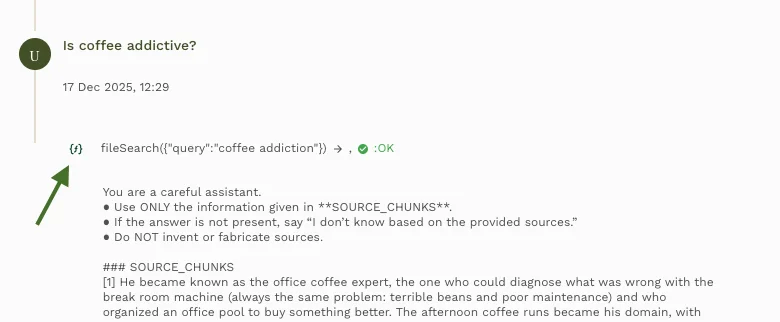
- If you see parts of your document in the session: document search ran → go to Step 2 or Step 3.
- If you do NOT see parts of your document in the session and it should have used the docs: turn ON Use knowledge on every reply so retrieval always runs. See the check box at the bottom of the image below.

Step 2: Chatbot gives irrelevant answers
Symptom: The chatbot answers, but the answer is irrelevant. This is because the parts of the document used to answer is incorrect.
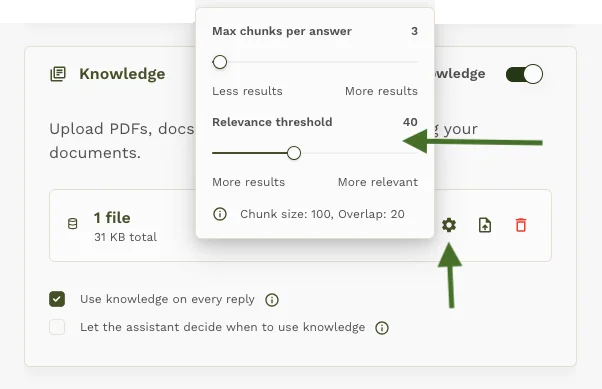
Solution: Increase Max chunks per answer. This returns more results to the model. To change this, click the gear icon (See arrow pointing to icon in image below).

How to adjust (recommended path):
- Default is 3
- Increase to 5
- If still irrelevant or missing key context, increase to 7
Good ranges:
- Typical: 3–7
- For complex docs / broad questions: up to 10 (too many chunks can add noise)
Step 3: Chatbot gives incomplete answers
Symptom: The answer is incomplete. This is because, the part of the document which was used to answer got truncated. So it starts the right answer, but misses the rest.
Solution: Increase Chunk size when uploading documents.
- Default Chunk size is 100
- Try 200–400
To change the chunk size, you must delete the existing knowledge because chunking happens at upload.
Click + ADD KNOWLEDGE again. Click the Advance options in the modal. See image below.
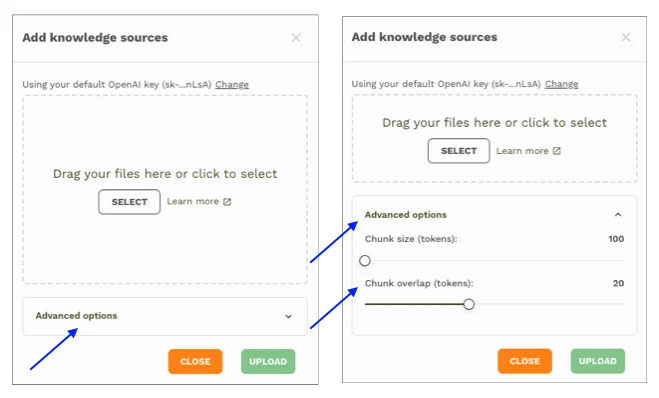
Note: It is preferable to keep the chunk size under 800, if at this chunk size the answers are still incomplete then the chunk overlap can be increased. The chunk overlap can be set to 10–20% of your chunk size. That is, if chunk size is 400 then overlap can be between 40–80.
Step 4: Chatbot can’t find information that exists in documents
Symptom: You know the info is in the document, but the chatbot keeps answering “generally” instead of using your content. File search runs, but doesn't return any result.
Solution: Reduce the RAG relevance threshold. To do so, click on the gear icon. You will see a slider with the title Relevance threshold, reduce this value. Refer the image below.
Step 5: Chatbot gives different answers to similar questions
Symptom: Asking the “same” question in slightly different wording gives noticeably different answers.
Solutions:
-
Tighten retrieval settings so the agent sees consistent context:
- Keep Max chunks per answer in a stable range (often 3–7 works well)
- Adjust Chunk size/overlap if answers are cut off or split (Step 3)
- Tighten system instructions so the agent behaves consistently.
Notes to keep in mind
- Relevance threshold & Max chunks per answer can usually be changed any time.
- Chunk size / chunk overlap require re-uploading documents to take effect as it changes how your docs are stored.
Search Result Tuning
Maximum Chunks Returned:
- 1-3 chunks - Very focused responses, faster processing
- 5-7 chunks - Balanced relevance and context
- 10+ chunks - Comprehensive context, slower responses and higher token usage
Cost Considerations
- More chunks returned = higher token usage per query
- Larger chunk sizes = more tokens per search result
Summary table
| Problem (symptom) | Solution (what to change) |
|---|---|
| Knowledge is OFF / docs not uploaded | Turn Use knowledge ON and confirm files are uploaded/visible. |
| Document search didn’t run (no chunks/snippets in Sessions) | Turn ON Use knowledge on every reply to force retrieval each message. |
| Irrelevant chunks retrieved (wrong topic/section/doc) | Increase Max chunks per answer (3 → 5 → 7; up to ~10 if needed). |
| Incomplete answer: chunk cuts off mid-thought | Re-upload docs with larger Chunk size (try 200–400 vs 100). |
| Incomplete answer: missing “in-between” info split across chunks | Re-upload docs with higher Chunk overlap (~10–20% of chunk size; e.g., size 400 → overlap 40–80). |
| Info exists in docs but agent answers generally / no chunks retrieved | Turn ON Use knowledge on every reply (forces retrieval). |
| Different answers to similar questions | Keep retrieval stable (Max chunks usually 3–7), fix chunking (size/overlap), and tighten system instructions for consistency. |