- Published on
How We Made Our RAG-Based Chatbot More Effective
- Authors

- Name
- Jai
- @jkntji
Most teams believe building an effective AI chatbot is a straightforward recipe: pick a powerful model, plug in your company data, and let the magic unfold. But this assumption is exactly why so many chatbot projects stall during pilot tests or quietly fail once they reach real customers. The truth is less glamorous: production-grade chatbots live or die on the fundamentals: clean data, reliable retrieval, carefully shaped context, and transparent observability that shows why a chatbot behaved the way it did.
The teams consistently winning with AI are not relying on hidden tricks, secret models, or mystical prompt engineering. Those teams treat chatbots like real systems, systems that demand rigor, monitoring, and strategy. If you are trying to bridge the gap between a cool demo and real business impact, our approach offers a blueprint worth studying.
This post walks through how we dramatically improved the accuracy and stability of our RAG-based chatbot, the challenges we encountered along the way, and the practical engineering that turned everything around.
The Core Problem: Retrieval Is the Hidden Engine of Accuracy
Many companies start strong with retrieval-augmented generation (RAG), only to watch the system hallucinate, misinterpret queries, or miss key details entirely. We faced the same frustrations:
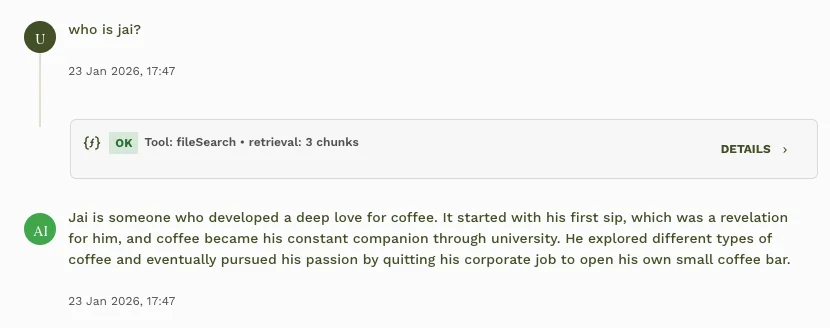
- The model sometimes triggered file search and sometimes did not, creating inconsistent behavior.
- File search did not always surface the right chunks, especially when information was scattered across documents.
- Large chunks inflated token usage; small chunks risked missing essential context.
- Even when retrieval occurred, replies sometimes blended old conversation context with new file search results, producing incoherent or overly summarized answers.
Instead of blaming the model, we looked under the hood and found that the real issue was retrieval strategy and the lack of strong guardrails.
What Worked: Fixes That Moved the Needle
We introduced a series of refinements that fundamentally improved reliability. Here is our TLDR:
1. Make file search mandatory by default.
Previously, the model could choose whether to call file search, a behavior that proved unreliable. Making retrieval the default step immediately reduced hallucinations.
2. Add intent detection inside the fileSearch schema.
This ensured that file search only ran when appropriate.
3. Enhance system instructions.
The chatbot now uses both the query and the detected intent for gatekeeping.
4. Skip file search for chitchat and empty queries.
A simple “Nice” should not trigger a multi-chunk retrieval and a forced summary. This fix alone dramatically improved conversational naturalness.
5. Make rag_threshold configurable.
Chunks below this threshold are silently skipped, reducing irrelevant retrieval and trimming token waste.
These small-sounding changes produced outsized returns.
Digging Deeper: The Problems We Encountered
1. Models aren’t consistent about when to retrieve.
Leaving the “should I call file search?” decision to the model introduced surprising variability. The same prompt could trigger retrieval in one run and skip it in another. More complex reasoning models were better at this, but using them for routine chatbot operations was costly and unnecessary for day-to-day work.
2. Retrieval often returned the wrong chunks.
Sometimes the answer lived across multiple scattered parts of a document. Sometimes too many chunks arrived, ballooning token usage. And sometimes the chunks were too narrow to provide meaningful context.
Our engineers realized that retrieval was not a yes/no switch, it was a configurable engine. So we gave users options:
- Max chunks per answer
- Minimum relevance threshold (rag score)
- Chunk size + overlap size
These dials gave teams the power to tune retrieval for accuracy and cost efficiency.
3. Always-on file search wasn’t always a good thing.
While “retrieve on every reply” increased accuracy, it also created a new failure mode. After several messages in a conversation, a user might drop in with a quick “Thanks!” or “Got it.” The system, forced to retrieve, would return chunks and the model would merge them with prior chat context, producing answers that felt oddly verbose or totally unrelated.
The fix: intent detection. We began classifying every user message. If the intent suggested chit-chat, acknowledgement, or anything non-informational, file search was simply skipped.
This single insight dramatically improved conversational quality.
Giving Users Full Observability
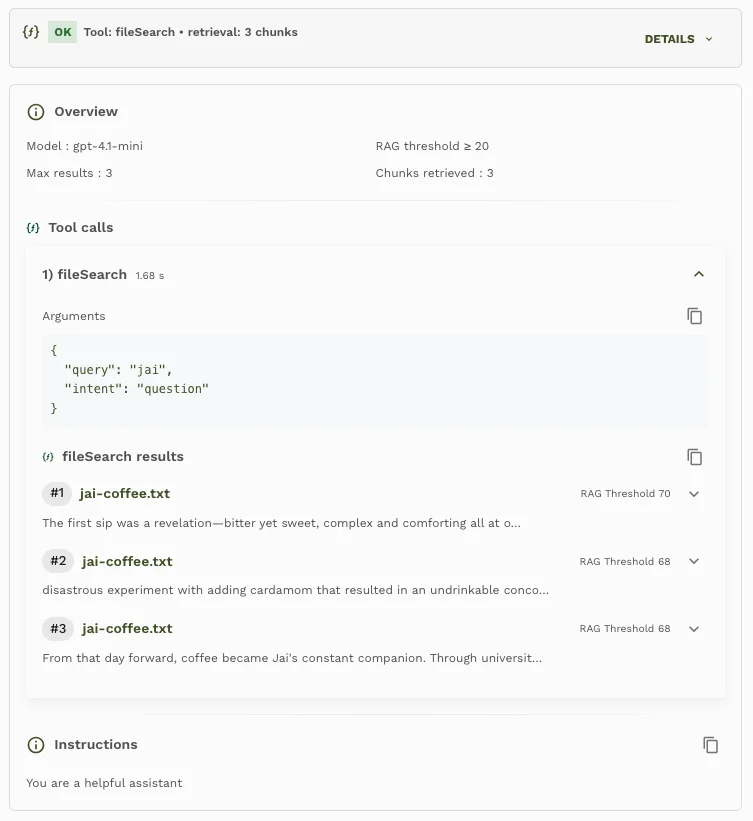
Another improvement was transparency. We built a sessions dashboard that showed the parameters influencing retrieval and generation. For every turn, you can see:
- Model name
- rag_threshold value
- Max chunks allowed
- Actual chunks retrieved
- Query & intent
- RAG score of each chunk
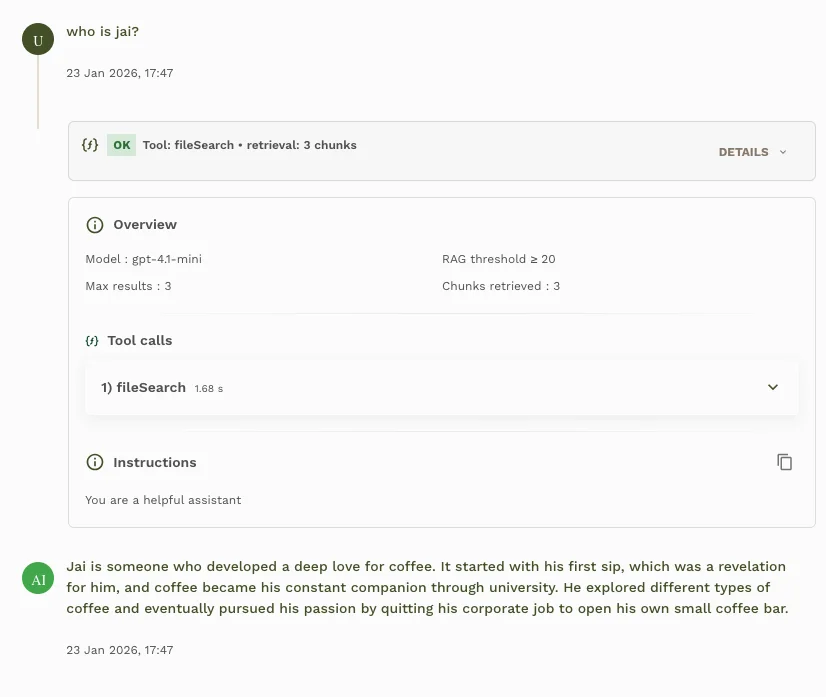
If a chunk’s RAG score was lower than the configured threshold, it was automatically excluded, and the dashboard made that clear.
This level of observability empowered teams to debug problems quickly. When an answer was not quite right, teams could inspect:
- whether the right chunks were retrieved
- whether the threshold was too strict
- whether chunk size was too small
- whether relevant content was missing entirely
And from there, tuning became straightforward.
A Unique Insight Worth Copying
We pair technical tuning with customer-centered metrics. We track how retrieval settings influence outcomes like resolution rate, time to first answer, and customer satisfaction. When the dashboard shows that a higher rag_threshold trims noise and lifts CSAT, our team has evidence that a configuration change matters to real people. This bridge between observability and business impact keeps the work mission-driven instead of purely mechanical.
The Sweet Spot: Sensible Defaults
After extensive experimentation, we found reliable defaults for most use cases:
- Chunk size: 200 tokens
- Overlap: 50 tokens
- Relevance threshold: 20
- Max chunks: 3
- Model: GPT-4.1-mini
These values struck a consistent balance between accuracy and efficiency.
But we also noticed something else: sometimes the problem was not the retrieval settings at all, sometimes the underlying documentation needed restructuring. If documentation was scattered across dozens of small sections or overly fragmented, increasing chunk size helped, but at higher token cost.
So while the platform can adapt to messy docs, a thoughtful documentation pass is still one of the highest-ROI improvements.
From Demo to Production: What We Learned
Our work reveals a fundamental pattern:
✨ RAG is not magic. It is engineering. ✨
Effective chatbots come from:
- Clear decision rules
- Intent-aware retrieval
- Tunable chunking
- Sensible defaults that work for 80% of cases
- Full visibility into how retrieval influenced the final answer
Not from hoping the model figures everything out intuitively.
When combined, these practices moved our chatbot from inconsistent to dependable, from “occasionally insightful” to “production-ready.”
Final Thoughts
It is easy to underestimate how much careful thinking goes into building a truly reliable RAG-based chatbot. Our journey shows that accuracy depends less on the model itself and more on the retrieval pipeline, the data structure, and the observability surrounding them.
If you are working on improving your own RAG system, or trying to understand why your chatbot works great in demos but falls apart in production, these learnings are worth exploring.
With the right strategy, retrieval becomes an asset rather than a liability. And that is how chatbots start delivering real business impact, not just toy-demo magic.
Here is a quick guide on how we fix wrong answers.
FAQs
Why make file search mandatory for a RAG chatbot?
Default retrieval reduces hallucinations and keeps every reply grounded before the model starts generating.
When should a chatbot skip file search?
Skip retrieval for greetings, acknowledgements, and empty prompts so quick replies stay natural and cost efficient.
How do I pick chunk size and overlap?
Start with 200-token chunks and a 50-token overlap, then adjust based on whether answers feel too narrow or too wordy.
What does a rag_threshold control?
The rag_threshold filters out low-relevance chunks, cutting noise while keeping highly scored context.
How can observability improve chatbot quality?
A session dashboard that surfaces model choice, thresholds, chunk counts, and scores lets teams debug misses and adjust settings fast.
What unique insight from this case study should teams copy?
Tie retrieval metrics to user outcomes such as resolution rate or CSAT so tuning decisions reflect real-world impact.